
Billing and Plans
Understand the 14-day trial, how to choose a plan, pay invoices, and manage AI credits and usage billing.
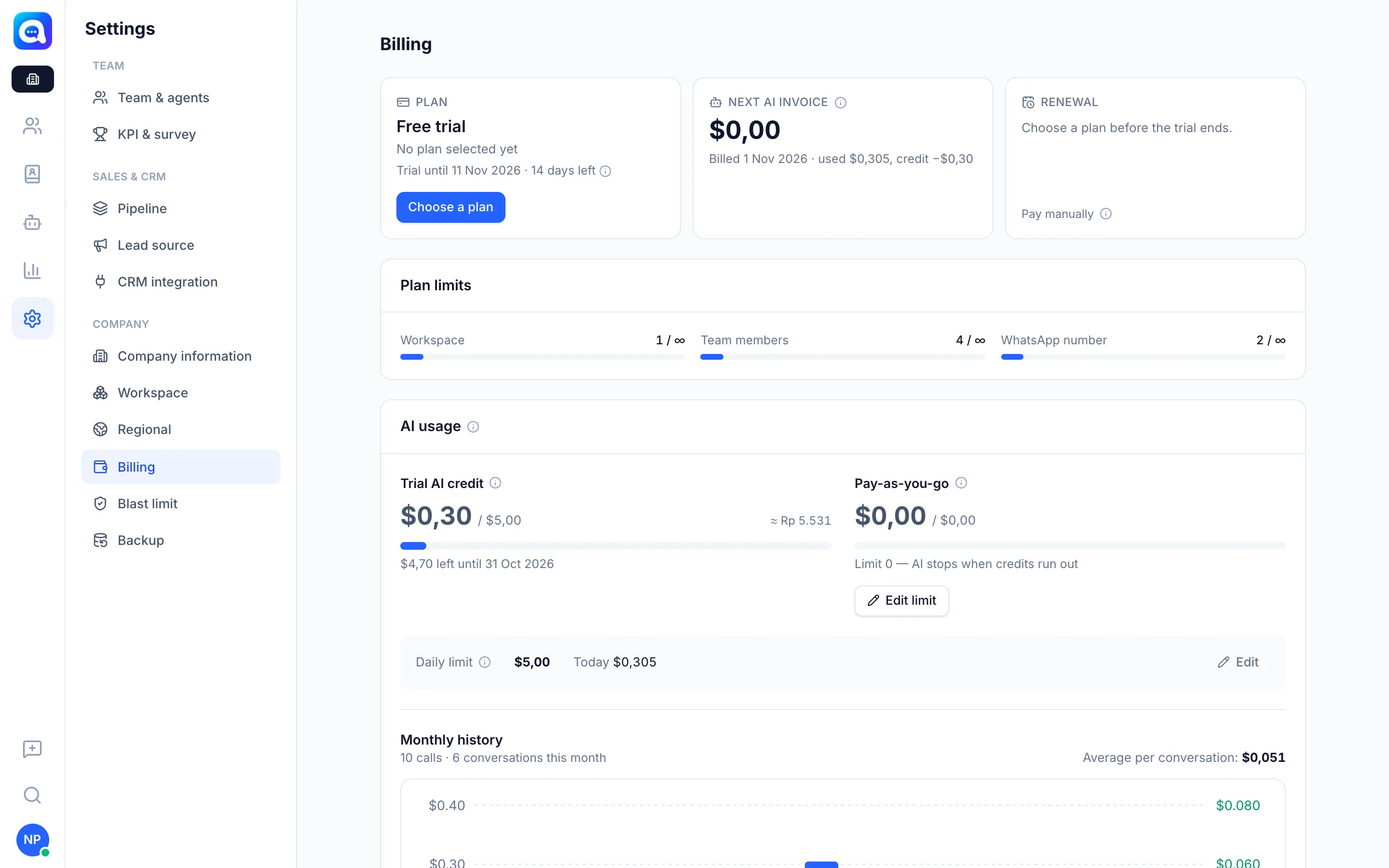
The Billing page shows your company's plan, invoices, and AI usage. This menu is only available at the Company level.
What it does
- Plan: subscription status. New companies get a 14-day Free trial with all features enabled and trial AI credits.
- Next AI invoice and Renewal (with the options Pay manually or Pay automatically by card).
- Plan limits: your usage of Workspace, Team members, and WhatsApp number against the plan limits.
- AI usage: Plan AI credits (refilled on the 1st of each month and used first) and Pay-as-you-go (used after credits run out, billed on the 1st for the previous month). Daily limit, Monthly history, and the average cost per conversation are available.
- Invoice: a list of bills with statuses such as Unpaid, Paid, Overdue, or Canceled.
Benefits
- AI costs are transparent and can be capped.
- Many ways to pay: local payments (QRIS, bank transfer, e-wallet) or international cards.
- Save with longer billing cycles.
Steps
- Open Billing. Choose Settings → Billing in the Company view.
- Choose a plan. Click Choose a plan (or Edit plan / Upgrade). Pick a plan and a cycle: Monthly, 3 months, Semester (6 months), or Yearly (12 months). Paying yearly is cheaper.
- Choose how to pay. Pick Local payment or International card, then Continue to payment. You are taken to a secure payment page and returned to this page. The plan becomes active once payment is received.
- Pay an invoice. In the Invoice section, click Pay on an Unpaid bill.
- Set AI limits. Click Edit limit for pay-as-you-go and Edit on Daily limit. Enter 0 if you want the AI to stop when credits run out. Pay-as-you-go does not apply during the trial.
Example: Kirana Bakery chooses the monthly plan and caps daily AI costs to keep the bill under control.
If unpaid or when the trial ends
After Trial ended without choosing a plan, or when the subscription is Overdue, AI features are restricted. AI usage invoices are due in 3 days, and if still unpaid the AI is restricted. If the AI quota runs out or the daily limit is reached, the AI stops replying and chats are handed over to the agent queue, and admins receive a notification.
Downgrading a plan takes effect at the end of the current cycle and there is no refund.
Tips
Choose a plan before day 14 so AI service is not interrupted. An international card lets renewals and AI bills be charged automatically.