
Managing Leads
Monitor all prospective customers on the Prospect page: filters, stages, columns, CSV export, manual add, and bulk actions.
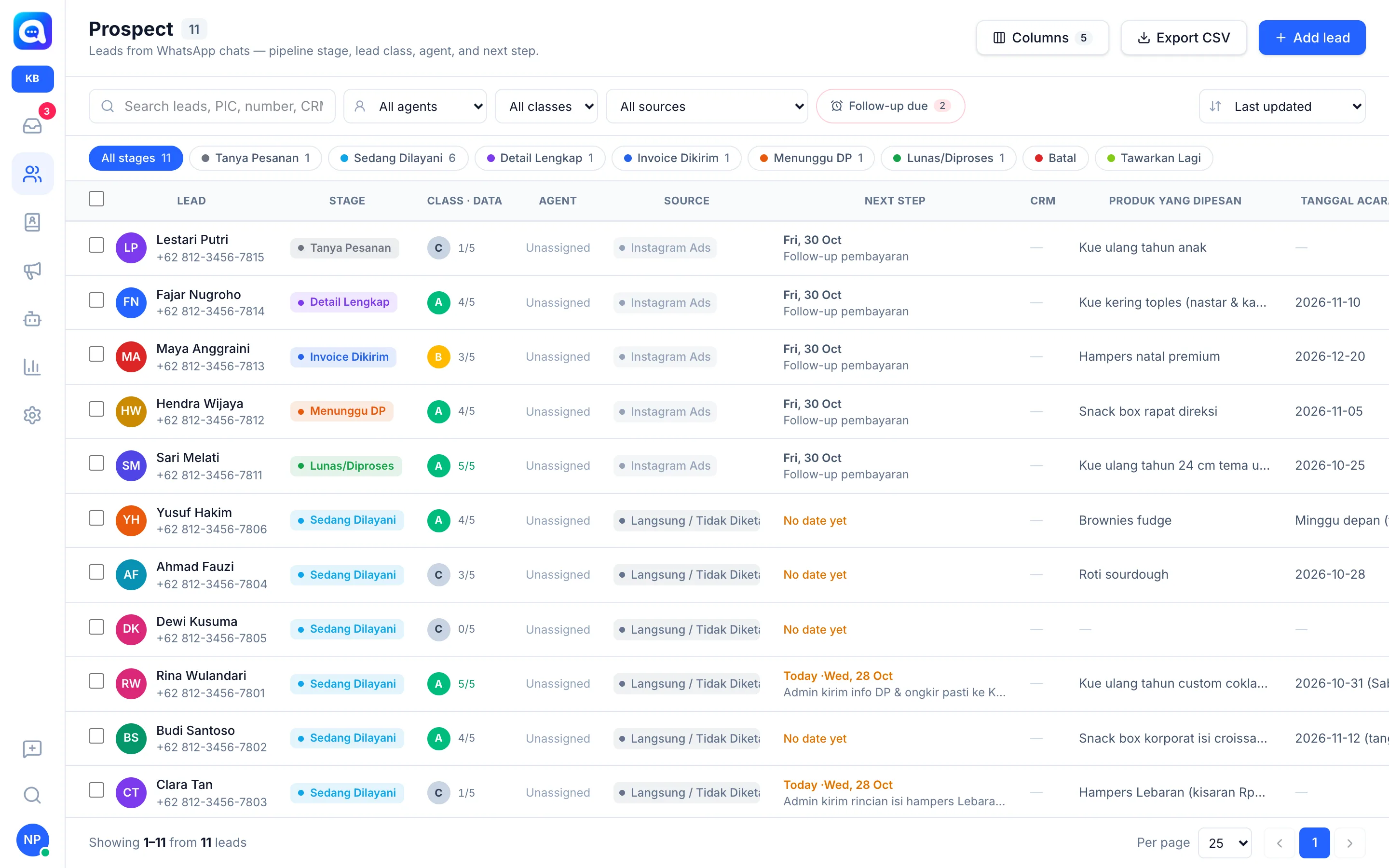
The Prospect page is a list of all prospective customers coming in from WhatsApp chats or the website widget. The sales team uses it to see who needs follow-up today.
What it does
Leads are recorded automatically when a chat comes in. Each row shows:
- Lead: name and number.
- Stage: position in the pipeline.
- Class · Data: lead class A / B / C and the number of qualification points (e.g. 4/5).
- Agent, Source, Next step (with date; red if overdue, "Today" if due), and CRM.
- Extra data columns you choose via the Columns button (e.g. ordered product, event date).
Filters at the top: a search field (name, PIC, number, CRM ID), All agents (including "Mine" and Unassigned), All classes, All sources, the Follow-up due button, and sorting (e.g. Last updated). Below are stage chips such as All stages, Being Served, or Awaiting DP, complete with counts.
Benefits
- One view of the entire sales pipeline.
- Leads overdue for follow-up are immediately visible.
- Bulk actions save time when handling many leads.
- Data can be exported for reports.
Steps
- Open Prospect. Click the Prospect icon in the left menu.
- Filter the list. Choose an agent, class, source, or click a stage chip. Click Follow-up due for leads that need to be contacted. Reset filters returns everything.
- Set the columns. Click Columns to show or hide data columns. Column settings apply to the whole team and only admins can change them.
- Open details. Click a row to open the lead's conversation and profile.
- Add a lead manually. Click Add lead, fill in Name, Phone number (WhatsApp), stage, source, and other data (for example for walk-in customers), then Save.
- Bulk actions. Tick several rows. In the top bar choose Assign agent (or Remove assignment), Change stage, Tag, or Send to CRM. Moving to a failed stage asks for a reason. Click Deselect to clear the selection.
- Export. Click Export CSV (available if your role allows it).
Tips
Start the day with the Follow-up due filter, then sort by the highest score.