
How AI Agent works
Understand how Kalea's AI Agent replies to chats, records customer data, scores leads, and hands off to your team.
This page explains what happens behind the scenes when a customer sends a message to your WhatsApp or chat widget. It is worth reading before you set up AI Agent for the first time.
What it does
Every time a customer sends a message, AI Agent works in this order:
- Reads its context. The AI reads the persona and instructions, knowledge (FAQs, documents, text), the product catalog, and the customer data already stored.
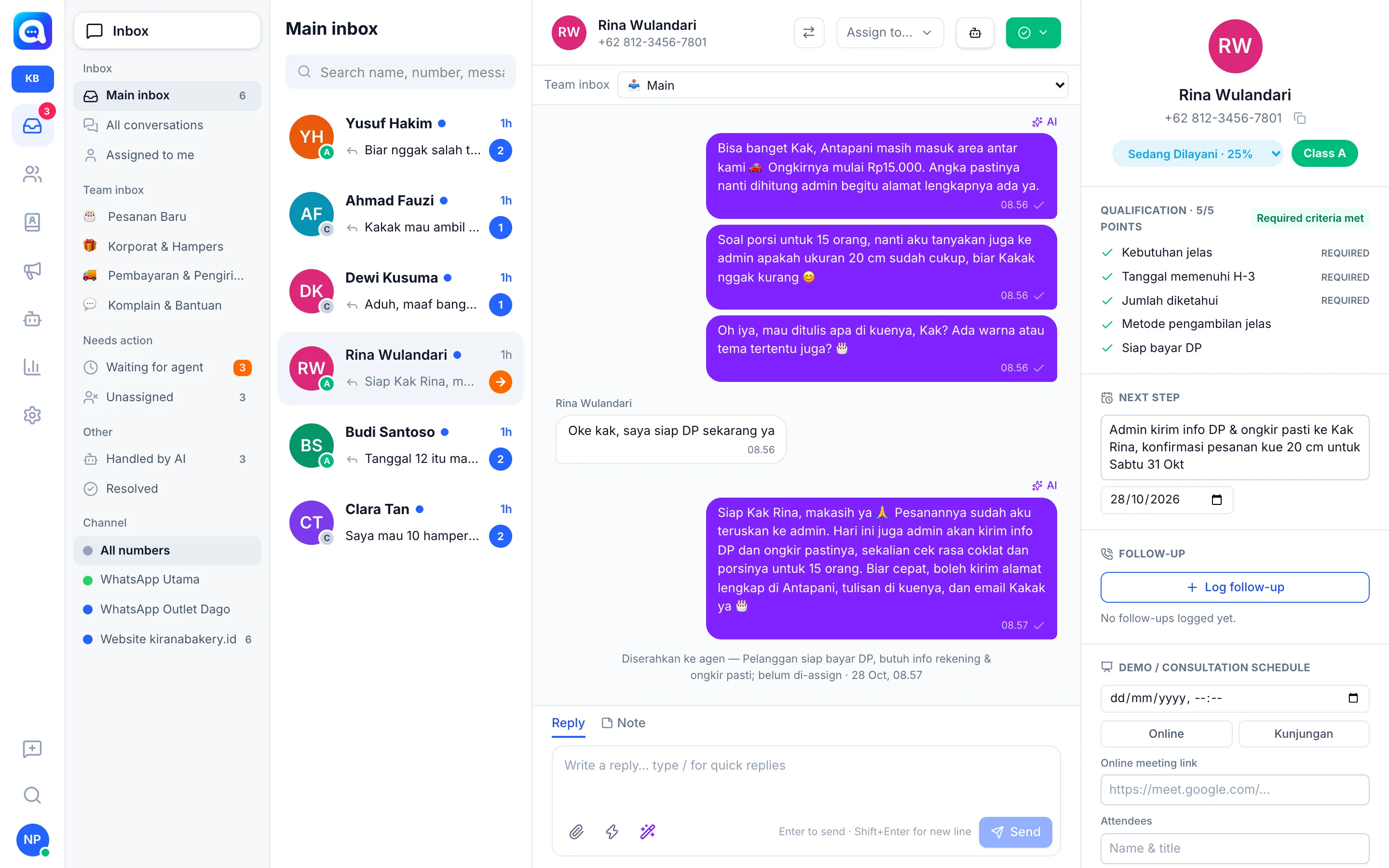
- Replies. The AI writes a short, natural reply and sends it to the customer. If the customer asks for a product photo, the AI sends it.
- Records data. Information the customer mentions (name, needs, quantity, etc.) is saved automatically to the lead data.
- Scores the lead. From the data collected, Kalea calculates the lead class A, B, or C.
- Schedules the next step. If the customer agrees to a demo or consultation on a certain day and time, the AI records the schedule. The AI also records the next step with a date.
- Hands off to a human. If the AI is unsure, the customer asks to speak with a person, or the lead is ready, the conversation is handed off to the team.
Channel purpose: Sales or Customer service
Every WhatsApp number and chat widget has a Purpose, set in Settings → WhatsApp number or Chat widget.
- Sales: new chats become leads. The AI explores needs, collects qualification data, scores the lead class, and schedules demos.
- Customer service: new chats only become contacts. The AI answers questions, collects contact data, and flags customers who clearly want to buy so the sales team can follow up.
Reply language
By default the AI replies in the language the customer uses, including if the customer switches language. Your instructions and knowledge can be in Indonesian; the AI translates their content, not the language of the reply. You can also force one language through AI reply language in the AI model tab.
Benefits
- Customers get replies 24 hours a day, including outside working hours.
- Lead data is recorded neatly with no manual input.
- The team only handles qualified leads.
- The AI does not make things up: answers come only from your knowledge and catalog, and anything else is handed off to the team.
Steps
- Open AI Agent. Choose the AI Agent menu. AI settings are managed at the company level (Company) by the company admin.
- Turn on AI. In the AI model tab, switch on AI replies to WhatsApp chats automatically.
- Prepare the AI's context. Fill in Persona & instructions, Knowledge, and the Product catalog.
- Decide what data to collect. Set up Lead qualification or Contact data.
- Set up handoff. See Handoff to agent.
- Test in the Playground. Try it first in the Playground before customers use it.
Tips
When the AI is turned off, all new chats go straight to the agent queue. This is useful when you want to handle things yourself for a while.