
AI mode per channel
Set when the AI replies and the purpose of each WhatsApp number or widget, Sales or Customer service.
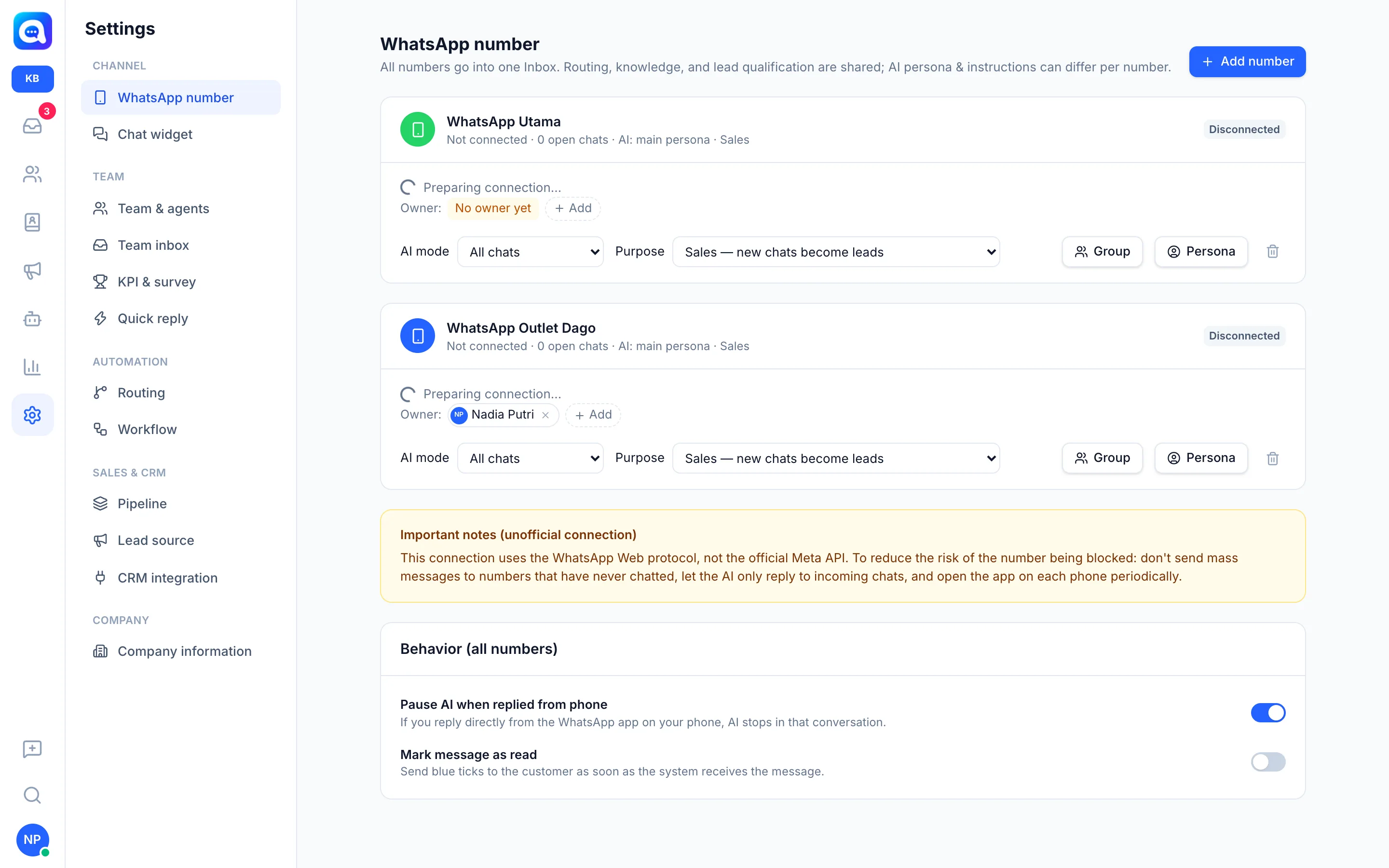
Every channel (WhatsApp number or chat widget) has its own AI settings. For example, Kirana Bakery uses the "WhatsApp Utama" number for selling cakes, while "WhatsApp Outlet Dago" is only for existing customers.
What it does
In Settings → WhatsApp number, each number has two options:
AI mode
- All chats: The AI answers every incoming chat.
- Blast replies only: The AI only answers contacts who reply to a blast from this number. A within … days after the blast field appears (1 to 90 days, default 7). Replies that arrive later are treated as ordinary chats and go straight to an agent. Conversations already being handled by the AI are still answered by the AI.
- Off — all to agents: The AI does not reply on this number.
Purpose
- Sales — new chats become leads: New contacts are recorded as leads (they enter Prospect, the pipeline, and KPIs). The AI collects lead qualification data, records the next step, and can schedule demos. See Lead qualification and Demo schedule & follow-up.
- Customer service — new chats become contacts: New contacts are only recorded as contacts. The AI focuses on answering questions and issues, does not offer products or schedule demos, and saves contact data (not lead data). If a customer clearly wants to buy, the AI flags the buying interest so the sales team can follow up. See Contact data.
On the Chat widget (AI & persona tab) the options are similar: Channel purpose (Sales or Customer service) and the AI replies automatically switch. The widget has no "Blast replies only" option.
Each channel can also have its own Persona (bot name, business name, instructions). If empty, the channel uses the workspace persona. See Persona & instructions.
Benefits
- One business can have a sales number and a service number with different AI behavior.
- Reduces the risk of a number being blocked: let the AI only reply to incoming chats.
- Data goes to the right place: leads for the sales team, contacts for the service team.
Steps
- Open the number list. Choose Settings → WhatsApp number.
- Choose the AI mode. On the card of the number you want, change AI mode. For Blast replies only, fill in the number of days after the blast.
- Choose the Purpose. Change Purpose to Sales or Customer service. Changes are saved automatically.
- Set the persona (optional). Click Persona on the number's card for a bot name and instructions specific to that number.
- Set up the widget. For a web widget, open Settings → Chat widget, the AI & persona tab, then choose the Channel purpose and turn AI replies automatically on or off.
Tips
For a number used for blasts, choose Blast replies only so the AI does not answer random chats and your team handles the other chats.
Only admins can change the AI mode and Purpose. If AI mode is turned off, all chats go to the agent queue.