
AI Agent/Handoff & testing
Handoff to agent
Set when the AI hands a conversation to your team: keywords, lead score, handoff message, and other behavior.
Handoff is when the AI stops replying and the conversation is passed to a human agent. Set it up well so important customers are not held up by the AI.
What it does
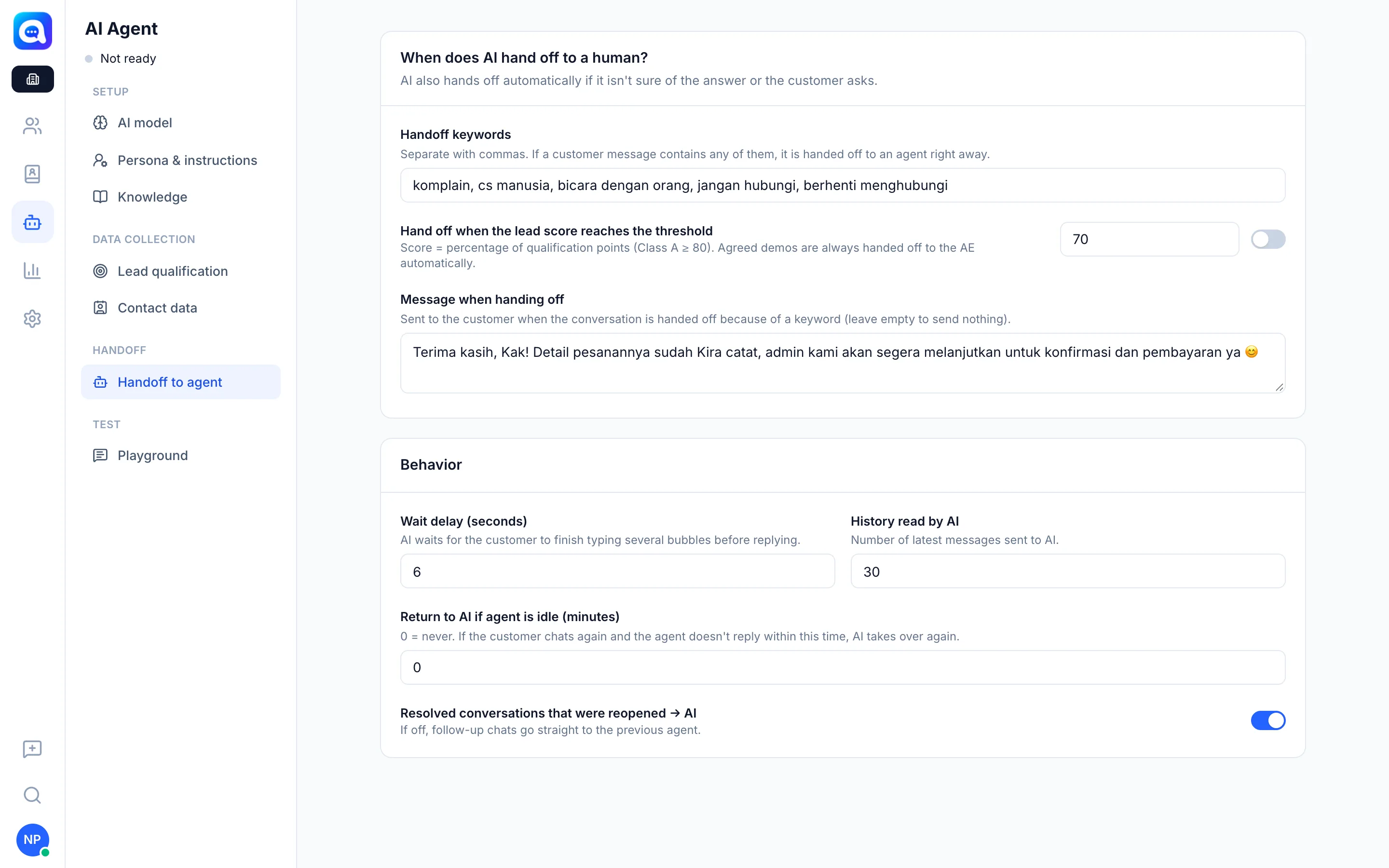
In the Handoff to agent tab, section When does AI hand off to a human?:
- Automatic: The AI hands off if it is unsure of the answer, the customer asks to speak with a person, there is a complaint, or the customer is ready to transact.
- Handoff keywords: Separate them with commas (e.g.
komplain, refund, manusia). If a customer's message contains any of them, it is handed off to an agent immediately. - Hand off when the lead score reaches the threshold: The score is the percentage of qualification points (Class A if 80 or more). Set the number, then turn on the toggle.
- Message when handing off: Sent to the customer when handed off because of a keyword. Leave it empty if you do not want to send one.
- Demos that have been agreed are always handed off to the AE automatically.
The Behavior section:
- Wait delay (seconds): The AI waits for the customer to finish typing several bubbles before replying.
- History read by AI: The number of most recent messages sent to the AI.
- Return to AI if agent is idle (minutes): 0 means never. If the customer chats again and the agent does not reply within this time, the AI takes over again.
- Resolved conversations that were reopened → AI: If off, follow-up chats go straight to the previous agent.
After handoff, the conversation goes to the agent, and a summary of the reason and the lead data are also recorded in the conversation.
Benefits
- Complaints and hot leads are handled by humans on time.
- The AI does not "insist" on answering things it does not know.
- The team gets full context when they receive the chat.
Steps
- Open the tab. Choose AI Agent → Handoff to agent.
- Enter keywords. Kirana Bakery example:
komplain, refund, pesanan custom, bicara admin. - Set the lead score. Turn on the toggle, then enter the score threshold (e.g. 80).
- Write the handoff message. Example: "Sure, we'll connect you to the Kirana Bakery team."
- Adjust behavior. Set the wait delay, history read, and return to AI.
- Save. Click Save.
Tips
Tip
Start with simple keywords, then add more from real conversations that should have been handled by a human.