
Demo schedule & follow-up
How the AI records the next step, schedules demos or consultations, and how agents view and change them.
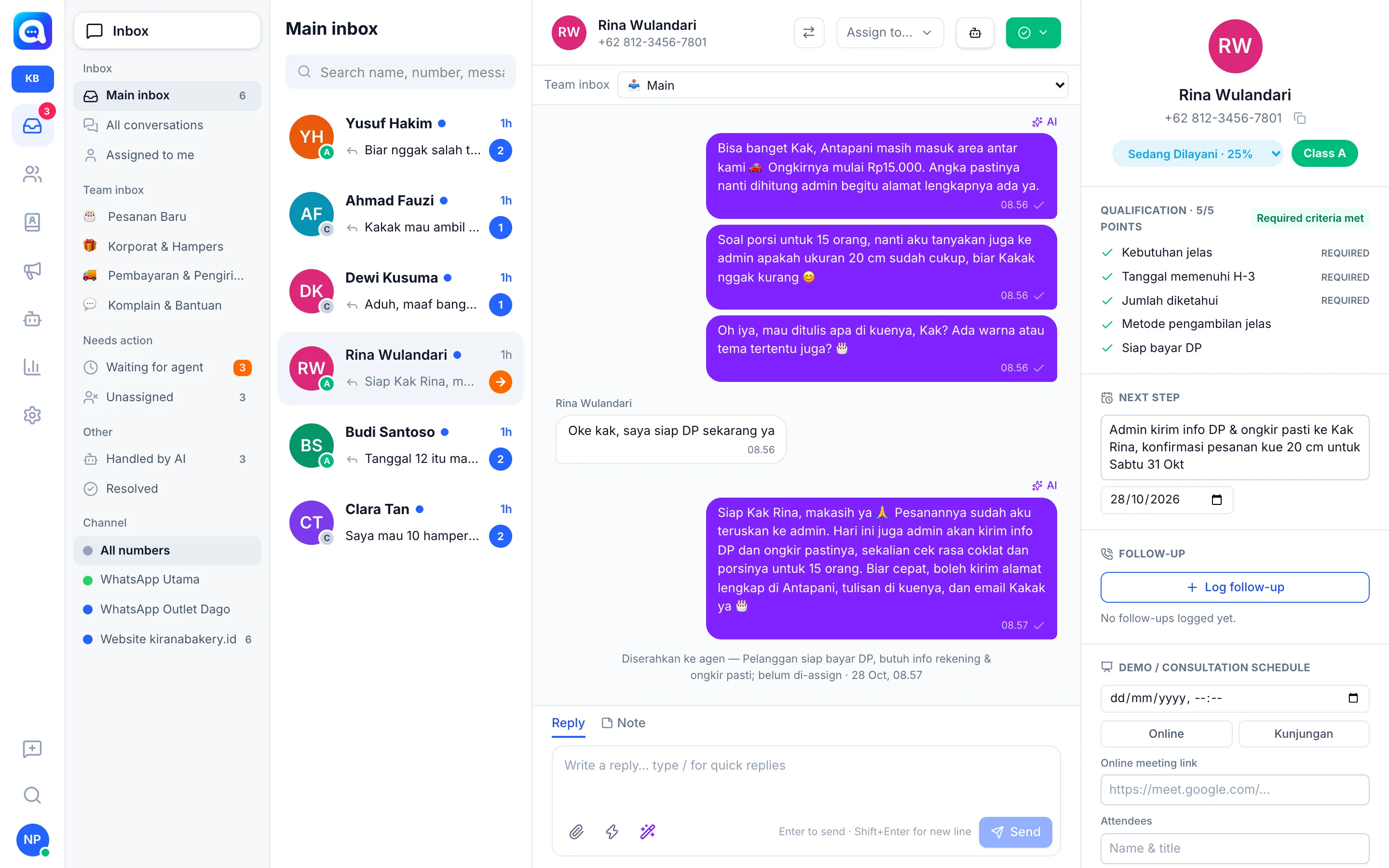
On channels with the Sales purpose, the AI does more than answer. It also records what should happen next, so leads are not forgotten. For example, when Rina orders a birthday cake, the AI records "Admin sends DP & shipping info" along with its date.
What it does
Next step. The AI is directed to close every conversation with a dated next step, not just "waiting to hear back". The text and date are saved in the lead profile and shown in the Next step column on the Prospect page.
Demo / consultation schedule. If the lead agrees to meet at a certain day and time, the AI records the schedule:
- Time (date and hour), in the workspace time zone.
- Online or Visit mode, the meeting link if online, and Attendees.
- The next step automatically becomes "Confirm schedule D-1".
- If the required lead qualification criteria are met, the lead automatically moves up to the Qualified stage and is handed off to the sales team.
Willingness without a definite date and time is not yet counted as a demo.
Early pipeline stages. The AI only moves leads in the early stages: from Lead to Contacted once there is a two-way conversation. Later stages are set by agents or automatically through the demo schedule. See Pipeline.
All of this applies only on Sales channels. On Customer service channels, the AI does not schedule demos.
Benefits
- No lead is left hanging without follow-up.
- Agents immediately know what to do today.
- Demo schedules are recorded neatly with links and participants.
Steps
- Make sure the channel's purpose is Sales. Check in Settings → WhatsApp number, the Purpose column.
- Open the lead profile. In the Inbox, choose a conversation, then look at the profile panel on the right.
- View the Next step. The NEXT STEP section contains the text and date recorded by the AI. Click the text box or date to change it. The date turns red and a Past due date mark appears if it has passed.
- Fill in Demo / consultation schedule. In the DEMO / CONSULTATION SCHEDULE section, choose the time, press Online or Visit, and fill in the Online meeting link (for Online) and Attendees.
- Log follow-up. Click Log follow-up after contacting the lead. This log counts toward the agent's KPI.
Tips
Make it a habit to check the Prospect page sorted by Nearest next step every morning.
Changes you make manually are saved and read by the AI in its next reply (the AI knows about demos that are already scheduled).