
AI Copilot for agents
Ask the AI to suggest replies, fix sentences, or summarize conversations right from the reply box.
Copilot helps human agents when they reply to chats themselves. It is useful when you take over from the AI and need quick writing help.
What it does
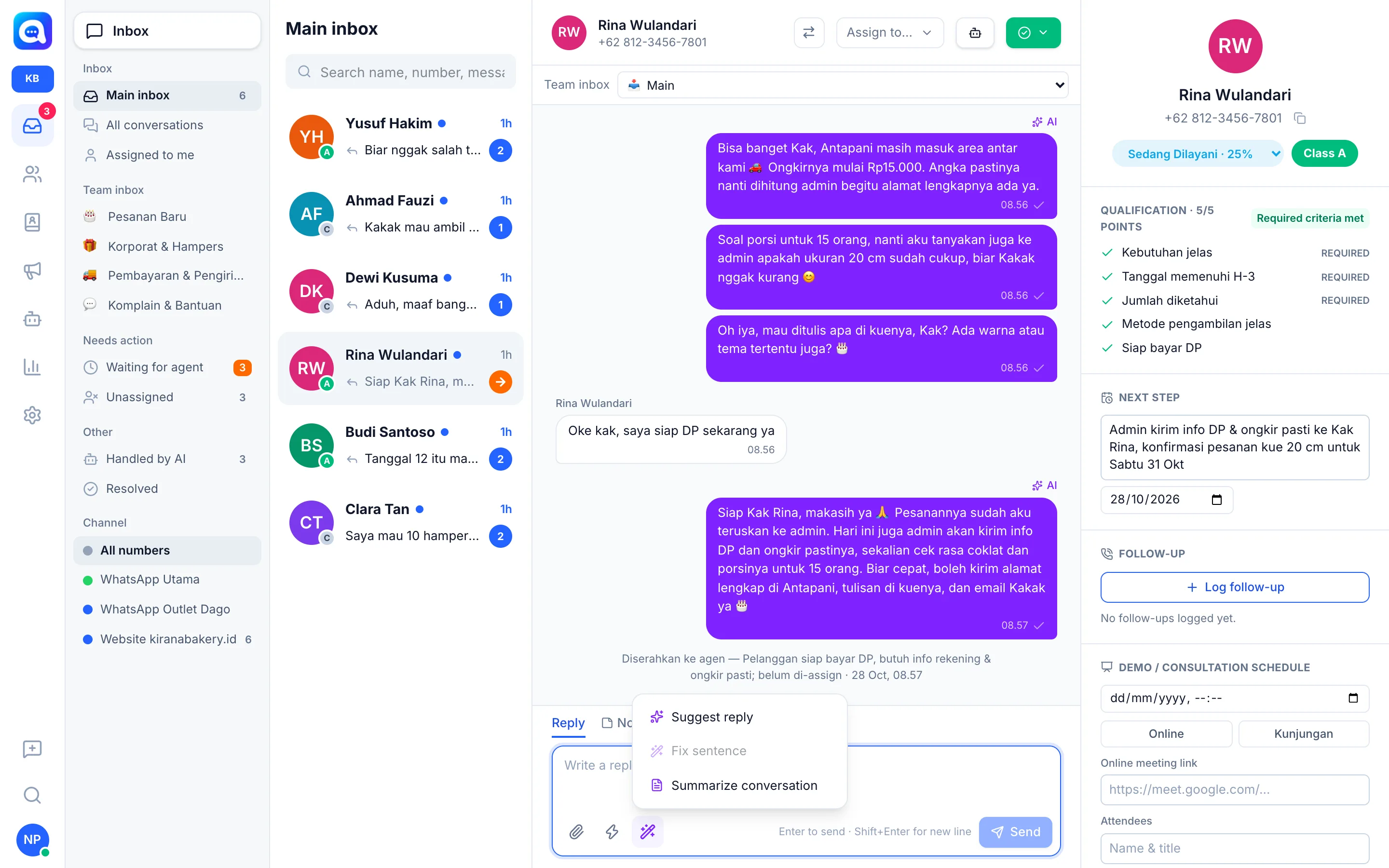
In the Inbox reply box, click the magic wand button (AI icon) to open the menu:
- Suggest reply: The AI writes one proposed next reply based on the chat history, your persona, and your knowledge. The result goes into the text box and is not sent yet, so you can edit it first.
- Fix sentence: The AI polishes a draft you have written so it is friendly, clear, and suited to WhatsApp. This item is disabled (gray) when the text box is empty.
- Summarize conversation: The AI creates a 3 to 5 point summary (customer needs, important data, next steps). The summary appears in the right-hand profile panel.
Copilot uses the main model selected in AI model & credits.
Cost
Every Copilot click counts as AI usage of the Agent copilot type: real tokens multiplied by the model price. With Platform AI, this cost uses your plan credits. See AI cost & usage. If credits or the daily limit run out, Copilot shows a message that the limit has been reached.
Benefits
- Faster replies that stay consistent with your business's style.
- New agents can use knowledge without memorizing it.
- Shift changes are easier with conversation summaries.
Steps
- Open a conversation. Choose a chat in the Inbox, then make sure the Reply tab is active.
- Open the Copilot menu. Click the magic wand button at the bottom left of the text box.
- Choose a task. Click Suggest reply, Fix sentence, or Summarize conversation.
- Review the result. For suggestions and fixes, the text appears in the text box. Check prices, dates, and promises before pressing Send.
- Read the summary. After Summarize conversation, a notification "Summary updated in the right panel" appears.
Tips
Write a rough draft first ("20 cm cake 285k can be picked up saturday"), then choose Fix sentence so the result is polite and tidy.
AI suggestions can be wrong. Always reread before sending, especially prices and schedules.