
Knowledge
Teach the AI with FAQs, documents, website pages, and text so its answers fit your business.
Knowledge is the AI's study material. The more complete it is, the more accurate the AI's answers about your products, prices, how to order, and policies.
What it does
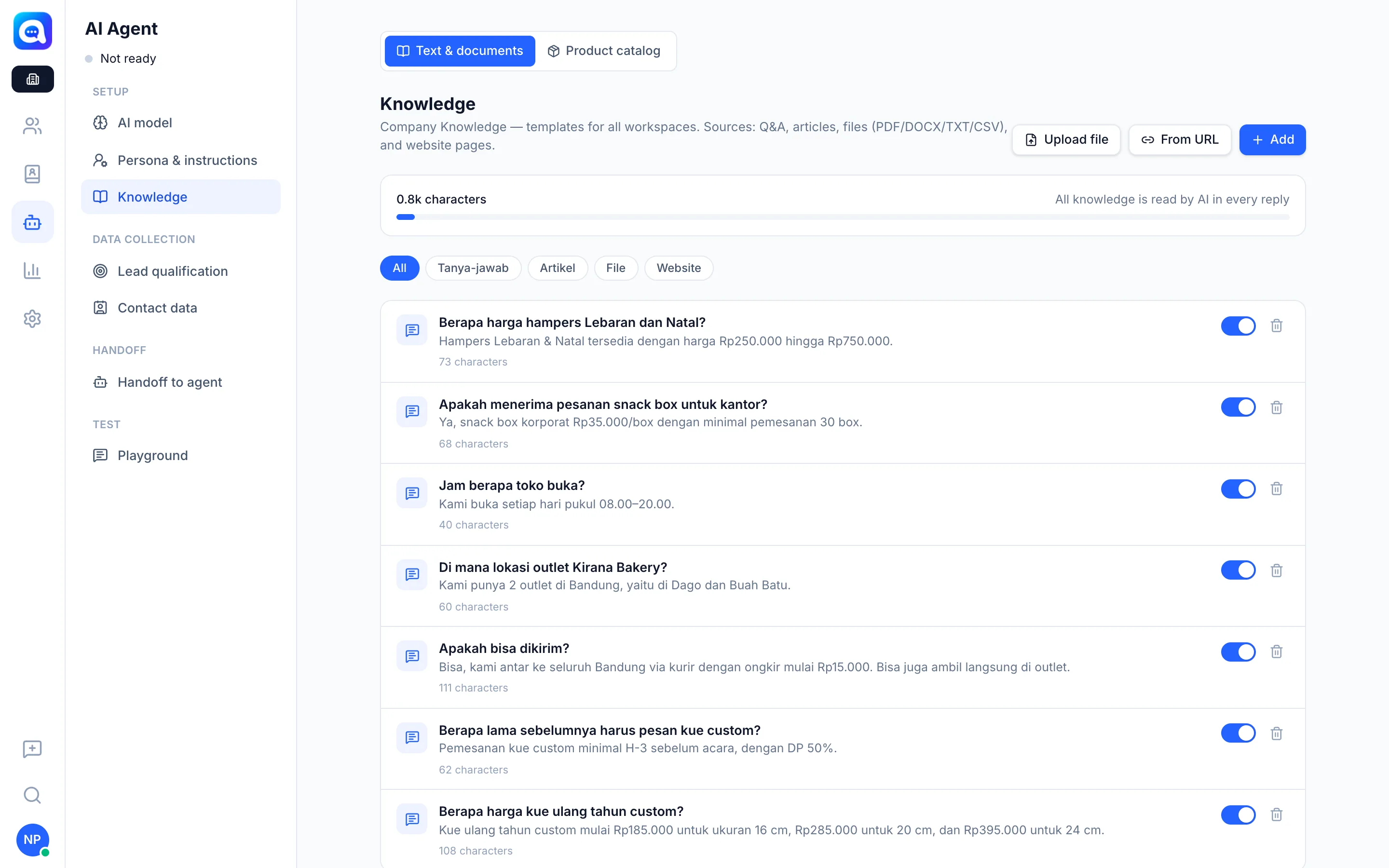
In the Knowledge tab (Text & documents sub-tab) you can add:
- Q&A (FAQ): pairs of Question and Answer, e.g. "What is the shipping cost outside Java?".
- Article / text: a free-form Title and Content.
- Files: upload PDF, DOCX, TXT, or CSV through Upload file.
- Website pages: click From URL, then Fetch page content. The page text is fetched and saved as knowledge.
Every entry can be deactivated without deleting it. Inside a workspace, Company knowledge can be used as is, Copy & edited for a workspace version, or Deactivated for that workspace only. Turn off Use Company knowledge if the workspace only uses its own knowledge.
Size limit and how the AI searches
Kalea shows the total characters of knowledge and the mode in use:
- All knowledge is read by AI in every reply: when the total is still small (up to about 40,000 characters), all content is read every time it replies.
- Search mode: when it is larger, the AI looks for the parts relevant to the customer's question before answering.
If the answer is not in the knowledge, the AI does not make it up and hands off to the team.
Benefits
- Consistent answers that follow your policies.
- Easy to update: change one entry and all following chats change too.
- The team does not need to repeat the same answers.
Steps
- Open Knowledge. Choose AI Agent → Knowledge, Text & documents sub-tab.
- Add an entry. Click Add for an FAQ or text, Upload file for a document, or From URL for a website page.
- Fill in and save. Kirana Bakery FAQ example: Question "How long ahead should I order a birthday cake?", Answer "At least 2 days ahead, with a 50% DP." Click Save.
- Set the status. Use Deactivate or Enable to turn an entry off or on.
- Check the size. Look at the character count and the mode (read all or search) at the top.
- Test. Ask in the Playground.
Tips
Write complete answers with clear numbers (opening hours, shipping cost, DP terms). Split long documents into several topics so searching is more accurate.
Product prices should be in the Product catalog, not in knowledge, so the AI takes prices from a definite source.