
Automation and AI Cost
Measure how many chats are resolved by AI, why the AI hands off to agents, and what its usage costs.
The Automation (AI) report is used by owners and managers to judge whether AI Agent really saves the team work, and what it costs. The report has two parts: automation at the top, AI cost & tokens below it.
What it does
Automation
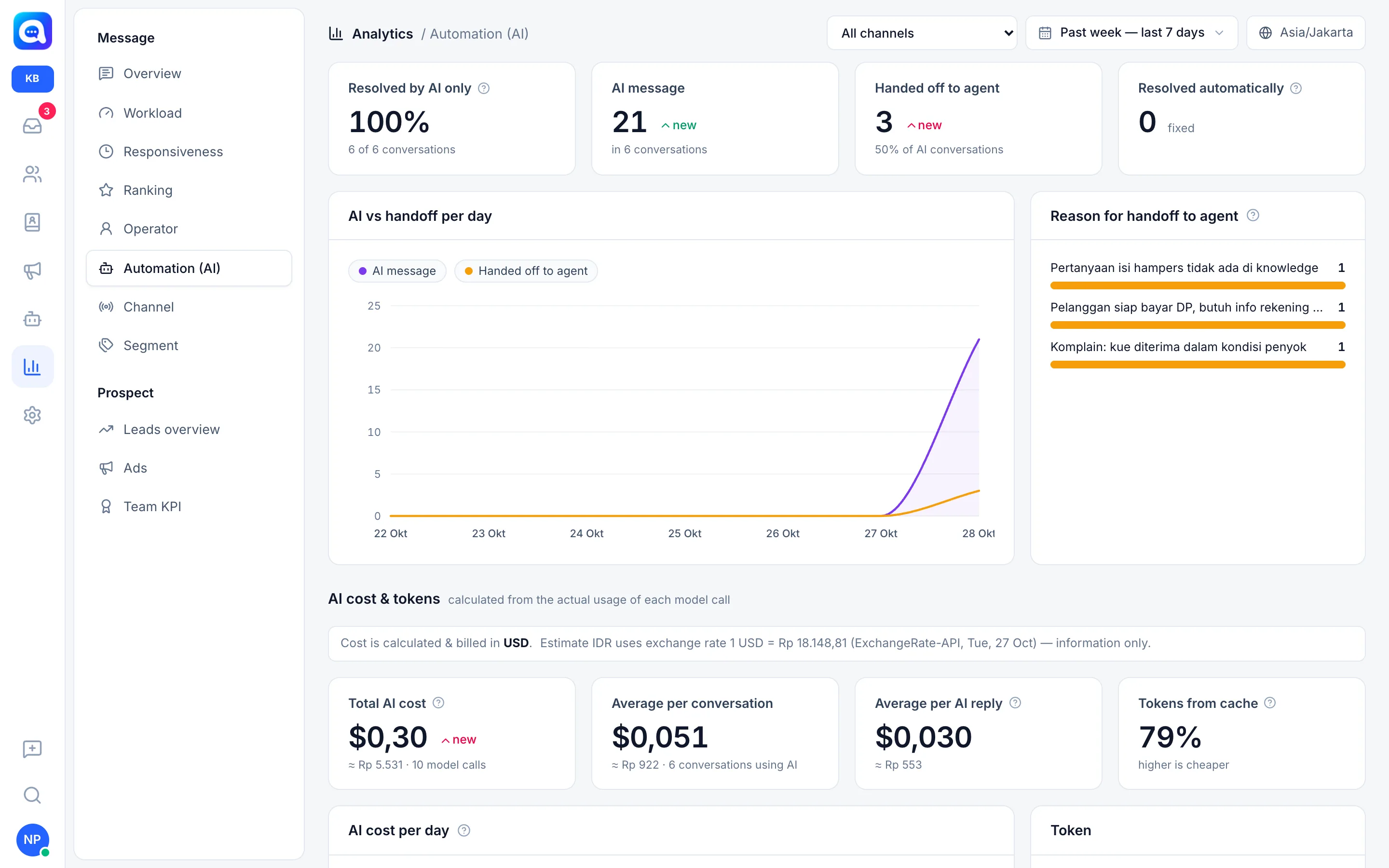
- Resolved by AI only: the percentage of new conversations replied to by the AI with no agent reply at all. The note under the number shows "X of Y conversations".
- AI message: the number of outgoing messages from the AI, along with the number of conversations involving the AI.
- Handed off to agent: the number of conversations the AI handed off to humans. The percentage below it is the share of AI conversations. Lower is better.
- Resolved automatically: conversations closed by a workflow without an agent.
- AI vs handoff per day: lines for AI message and Handed off to agent.
- Reason for handoff to agent: a list of reasons recorded at handoff (from AI tools, handoff keywords, routing, or errors), sorted from most frequent, up to 12.
AI cost & tokens
Cost is calculated from the real usage of each model call and billed in USD. If a local currency is set in Settings → Regional, an estimate such as "≈ Rp 5,531" appears using the rate shown, for information only.
- Total AI cost: all calls (replies, copilot, classification, image reading, trials) along with the number of calls.
- Average per conversation: total cost divided by the number of conversations that used AI.
- Average per AI reply: the cost of reply calls divided by the number of recorded reply calls.
- Tokens from cache: the share of input tokens read from the cache. The higher the cheaper. It drops when the gap between replies is longer than 5 minutes.
- AI cost per day: a cost line, plus a Daily limit line if set in Settings → Billing.
- Tokens: Input (no cache), Input from cache, Written to cache, Output.
- Per call type: Reply to customer, Agent copilot, Topic classification, Read image, Trial (Playground), complete with tokens and cost.
- Per model and AI cost per conversation (the 25 most expensive conversations, click to open).
If there are calls with a model whose price is not yet in the catalog, a warning appears: its tokens are recorded but its cost is not calculated.
Benefits
- Know what percentage of chats do not need to touch an agent.
- Find knowledge gaps from handoff reasons.
- Control costs and detect usage spikes.
- Find conversations that waste tokens.
Steps
- Open Automation (AI). Choose that menu in the Message group.
- Read the four cards. Aim for Resolved by AI only to go up and Handed off to agent to go down.
- Review handoff reasons. A frequently repeated reason, e.g. "Question about hampers contents is not in the knowledge", means knowledge needs to be added.
- Fix the source. Complete the knowledge or reorganize the handoff rules.
- Scroll to AI cost & tokens. Compare Total AI cost with the previous period.
- Check AI cost per conversation. A very expensive conversation is usually too long or repetitive. Open it and look for the cause.
Example
In Kirana Bakery's report, 3 handoffs were recorded with these reasons: hampers contents not in the knowledge, a customer ready to pay the DP needing account info, and a complaint about a cake received dented. The first two can be prevented by adding knowledge. The third truly needs a human.
Tips
Handoffs because of complaints or payments are normal and should still go to agents. Focus on the "not in the knowledge" reasons.
Local currency estimates do not affect billing. The AI daily limit is set in Settings → Billing.