
KPI Report
Understand how individual KPI, squad KPI, and Total KPI scores are calculated in Analytics → Team KPI.
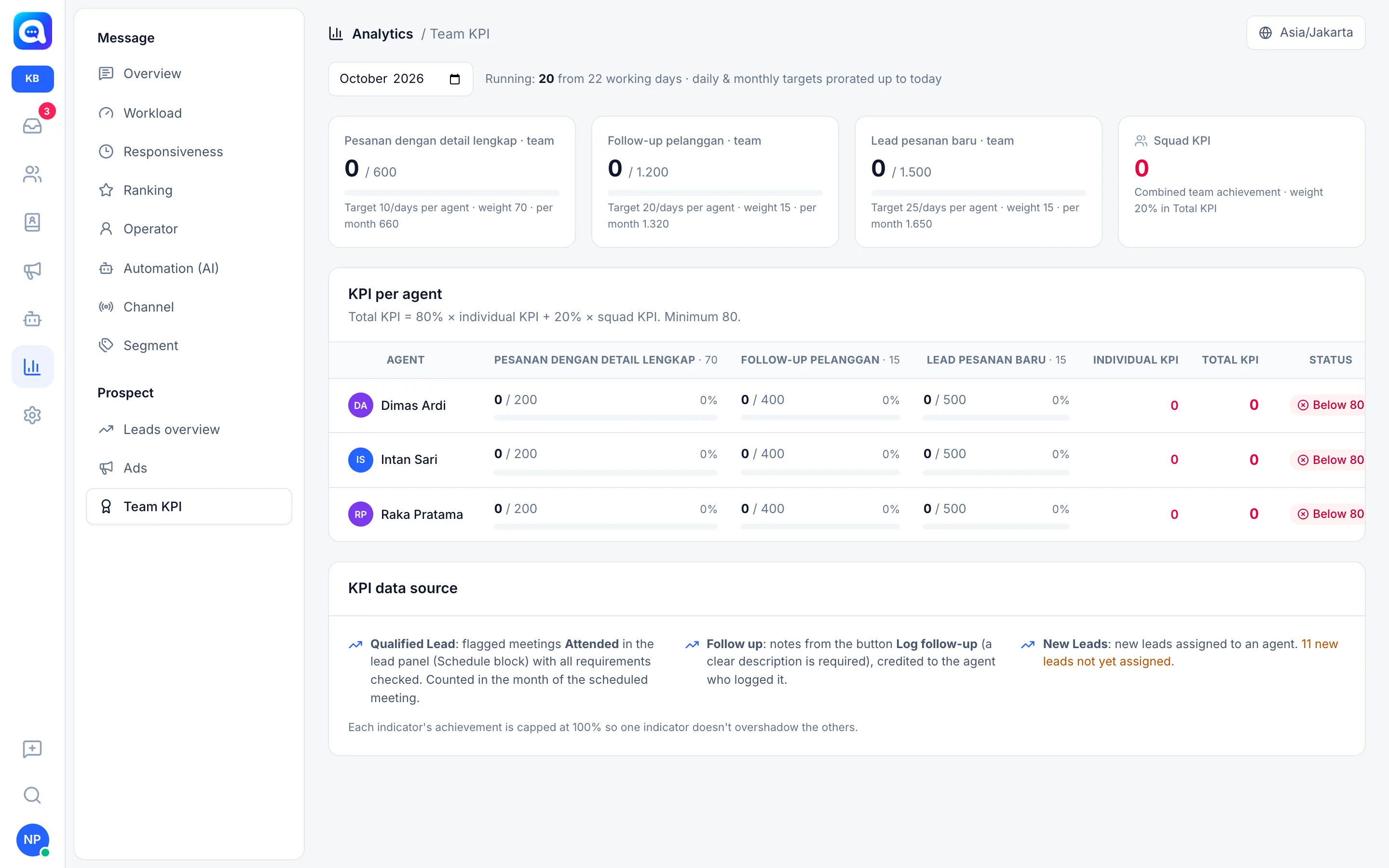
The Team KPI report shows each agent's target achievement in one month. Managers use it to assess performance and as a basis for incentives. Targets and weights are set in Settings → KPI & survey (see KPI and surveys).
What it does
Unlike other reports, Team KPI uses a month picker, not a date range or channel filter. Choose the month at the top left. For the current month, it says "In progress: X of Y working days" and the target is prorated up to today. Past months use the full target.
Indicator cards (team). One card per active indicator, for example Orders with complete details, Customer follow-up, and New order leads. Each card shows the whole team's achievement compared with the team target, plus a note on the target per agent, the weight, and the full-month target. The Squad KPI card shows the combined team score.
KPI table per agent. For each agent there is the achievement on each indicator (value, target, percent, bar), Individual KPI, Total KPI, and Status (Meets or Below the minimum threshold).
KPI data source. Three sources:
- Qualified Lead: meetings marked Attended in the lead panel, counted in the month of the meeting schedule.
- Follow up: notes from the Log follow-up button, credited to the agent who logged them.
- New Leads: new leads assigned to an agent, with the institution or company name field clearly filled in (at least 3 characters). Incomplete ones are marked "no institution name (not counted)", and leads that are not yet assigned are reported separately.
How it is calculated
- Running target. The daily target is multiplied by working days up to today. The monthly target is multiplied by the proportion of working days that have passed.
- Indicator score. Achievement divided by target, capped at 100%, so one indicator does not cover for the others.
- Individual KPI. A weighted average: the sum of (weight × achievement) divided by the total weight, on a scale of 0 to 100.
- Squad KPI. The same formula, but from the total achievement of all agents compared with the total target of all agents.
- Total KPI. (individual weight × Individual KPI + squad weight × Squad KPI) divided by the total of both weights. Example at Kirana Bakery: 80% individual + 20% squad, minimum threshold 80.
- Status. Meets if the Total KPI reaches the minimum threshold. Number colors: green if it meets, yellow if at least 75% of the threshold, red below that.
Benefits
- Transparent agent assessment that is the same for everyone.
- Encourages cooperation through the squad component.
- A fair basis for incentives.
- Know which indicator is lagging the most.
Steps
- Open Team KPI. In Analytics, choose Team KPI in the Prospect group.
- Choose a month. The current month shows interim progress, the previous month shows final results.
- Read the team cards. See which indicators are far from target.
- Check the agent table. Look for agents whose bar is low on a specific indicator.
- Check the yellow notes. Leads without an institution name or not yet assigned are not counted, so tidy up the data.
- Follow up. Coach lagging agents, then monitor again next week.
Tips
Check in the middle of the month. Because the target is prorated, the percentage on day 10 already reflects whether the agent is on the right track.
This report does not have Today or Yesterday options. Time choices are by month: choose the current month or the previous month in the month picker.