
Analytics/Basics
KPI and Surveys
Set performance targets for sales agents and send satisfaction surveys (CSAT) after chats end.
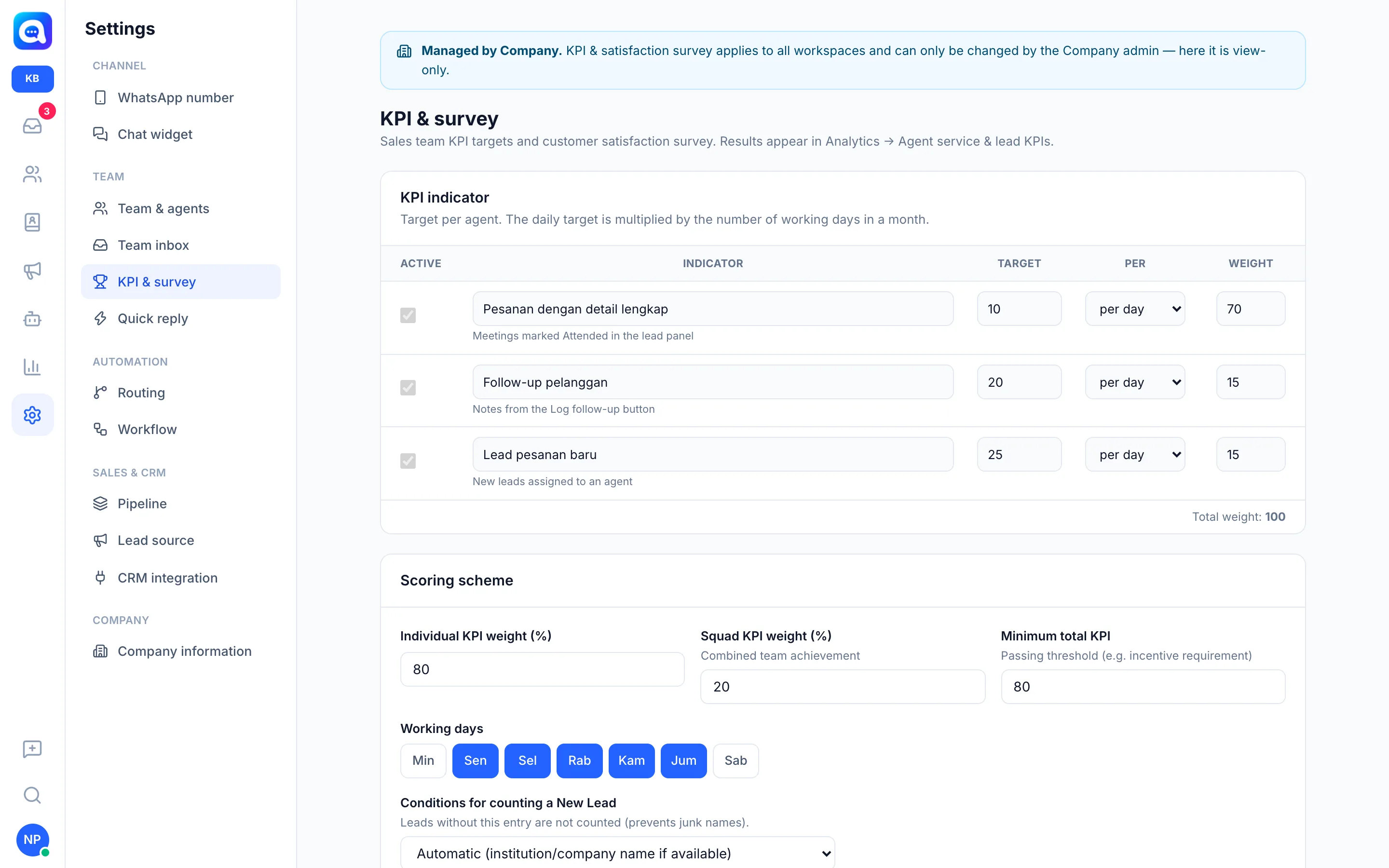
The Settings → KPI & survey page is used by managers to set agent targets and measure customer satisfaction. The results appear in Analytics. These settings apply to all workspaces and can only be changed by Company admins.
What it does
- KPI indicator: a list of indicators per agent, each with Active, the indicator name, Target, the Per period (per day or per month), and Weight. Daily targets are multiplied by the number of working days in a month. Example indicators: orders with complete details (from meetings marked Attended), customer follow-ups (from the Log follow-up button), and new leads assigned to the agent.
- Scoring scheme: Individual KPI weight (%), Squad KPI weight (%) (combined team achievement), Minimum total KPI (the pass threshold, e.g. an incentive requirement), Working days, and Conditions for counting a New Lead so careless leads are not counted. Leave Rated agents empty to include all team members except the owner.
- Satisfaction survey (CSAT): Survey message and Thank-you reply, plus the Answer time limit (hours).
Benefits
- Clear, measurable team targets.
- A fair basis for incentives.
- Know customers' satisfaction with each agent's service.
Steps
- Open settings. Choose Settings → KPI & survey (Company view).
- Set indicators. Check Active, fill in Target, choose Per day or Per month, then fill in Weight. Aim for a Total weight of 100.
- Set the scoring scheme. Fill in the individual and squad weights, the Minimum total KPI, and choose the Working days. For example, Kirana Bakery gives a weight of 80 to individual, 20 to squad, and a pass threshold of 80.
- Set up the survey. Adjust the Survey message and Thank-you reply. The survey is sent when an agent closes a chat with the Resolve + send satisfaction survey option. A reply of a number from 1 to 5 is recorded as a rating for the agent who handled it.
- Save. Click Save. See the results in Analytics, in Ranking (CSAT) and Team KPI.
Tips
Tip
After the answer time limit passes, a customer's reply is treated as an ordinary message, so set a reasonable limit.