
Lead Class and Qualification
How Kalea calculates lead class A, B, or C from the data the AI collects from conversations.
Not all prospective customers are equally ready. Lead class helps the Kirana Bakery team know which ones to pursue first.
What it does
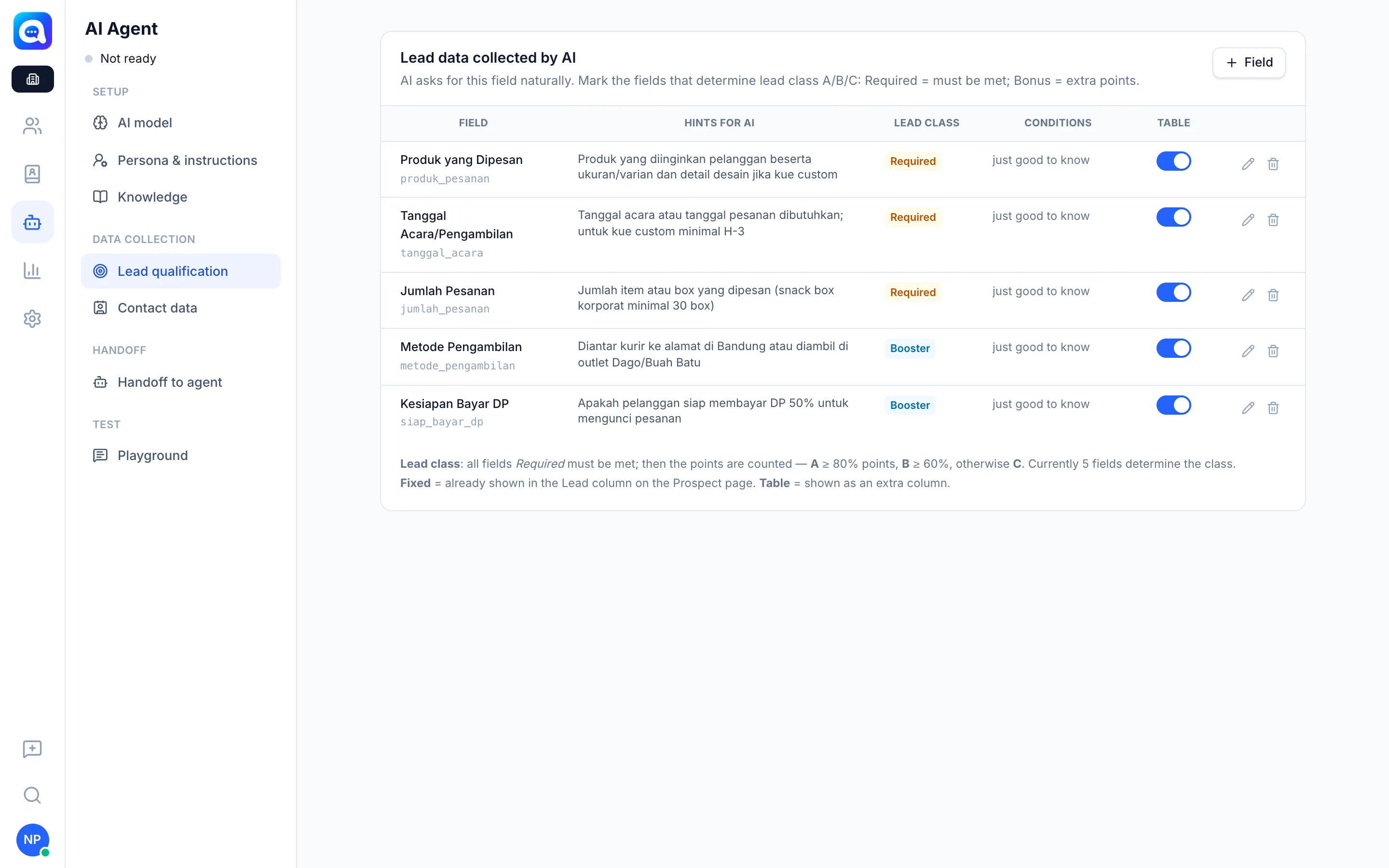
The class is calculated from the qualification fields you define in AI Agent → Lead qualification. Kirana Bakery's example: Ordered Product, Event/Pickup Date, Order Quantity (Required), plus Pickup Method and DP Payment Readiness (Booster).
The rules:
- All Required fields must be fulfilled. If not, the class is C.
- Each fulfilled field is worth one point.
- A if points reach 80% or more, B if 60% or more, otherwise C.
The AI asks for these fields naturally during the chat and fills them in itself from the customer's answers. The result appears in the profile panel as Qualification · 5/5 points with the note Required criteria met or Required criteria incomplete. The A/B/C class also appears in the chat list and the Prospect table.
Example: out of 5 fields, 3 are required. The customer has given 4 pieces of data including the 3 required ones, so 4/5 = 80% and the class is A. If one required field is still unknown, the class stays C even if there are many other points.
Benefits
- Follow-up priorities based on data, not gut feeling.
- Criteria can be adjusted to your business.
- Agents don't need to ask again because the AI has already recorded it.
- The class can be used in Routing and lead filters.
Steps
- Open settings. Choose AI Agent → Lead qualification.
- Add a field. Click Field, give it a name and a hint for the AI (how to ask for it).
- Define its role. Mark the field as Required or Booster, and set conditions if needed (e.g. a minimum number).
- Enable the table column. Turn on the Table switch so the data appears as a column on the Prospect page.
- Monitor the results. Open a conversation and look at the Qualification block in the right panel. Setting details are in Lead qualification.
Tips
Make only things that truly determine whether an order can be processed Required. Too many required fields leave many leads stuck in class C.