Prospects & Contacts/Prospects
Lead Sources and Ads
Record where leads come from, including automatic detection of chats from Click-to-WhatsApp ads.
Knowing where leads come from helps you judge which promotion channels actually generate orders.
What it does
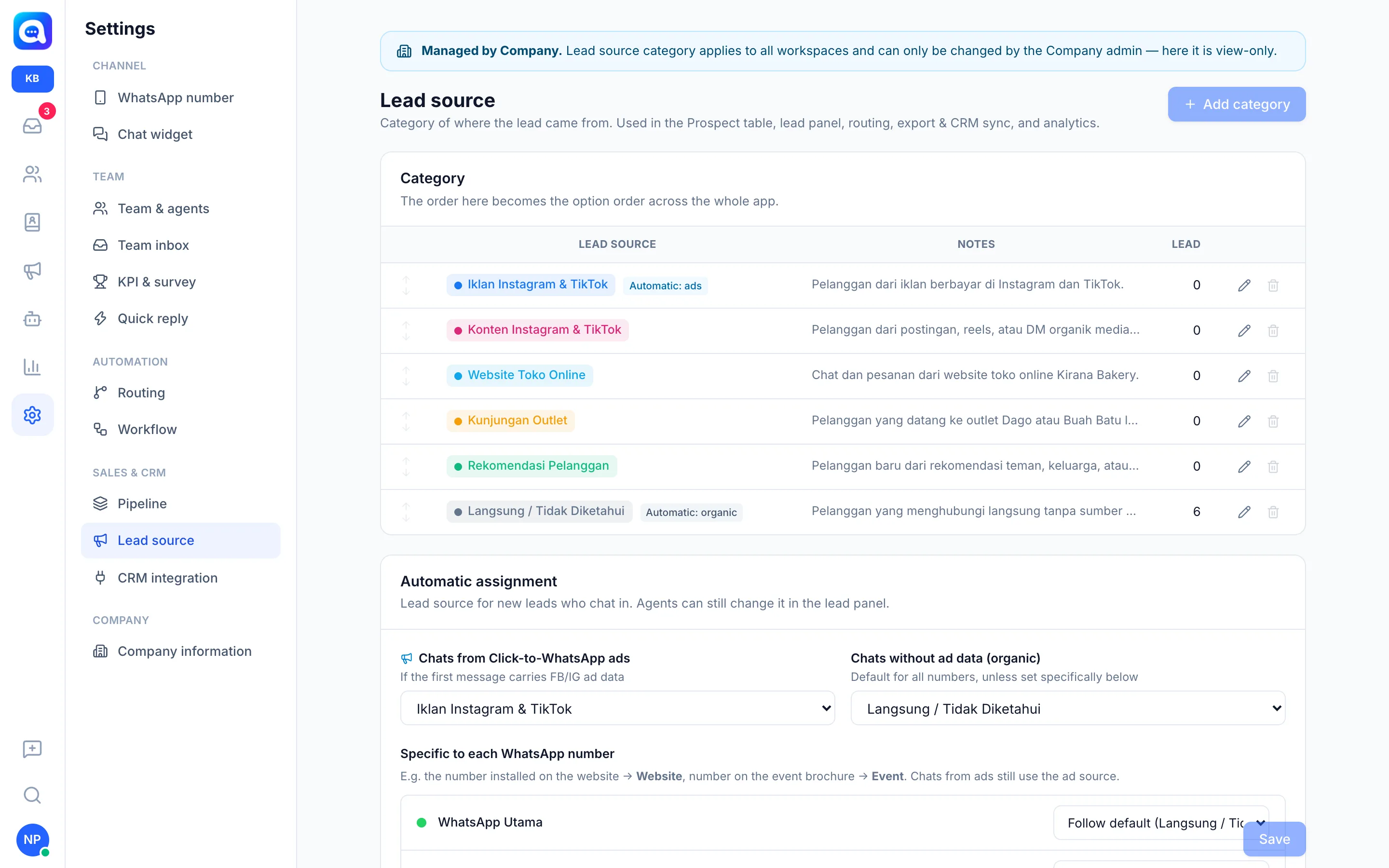
Lead source is the category of a lead's origin. Kirana Bakery's example: Instagram & TikTok Ads, Instagram & TikTok Content, Online Store Website, Outlet Visit, Customer Referral, and Direct / Unknown. Categories are used in the Prospect table, lead panel, routing, exports, CRM sync, and analytics.
Automatic assignment for new leads:
- Chats from Click-to-WhatsApp ads: if the first message carries FB/IG ad data, Kalea detects it automatically and uses the ad source you chose. The ad title or link is recorded in the conversation history.
- Chats without ad data (organic): uses the default source.
- Specific to each WhatsApp number: e.g. the number placed on the website uses the Website source. Chats from ads still use the ad source.
Agents can still change the lead source in the lead panel.
Benefits
- Know which ads generate leads.
- Reporting per source in analytics.
- Can be used as a routing condition.
Steps
- Open Lead source. Choose Settings → Lead source (managed by the central admin).
- Manage categories. Click Add category, enter a name and optional description, choose a color. Use the pencil icon to edit. A name already used by leads can be renamed and the leads are updated too.
- Set automatic assignment. Choose the source for Chats from Click-to-WhatsApp ads and Chats without ad data (organic).
- Set per number. Under Specific to each WhatsApp number, choose a specific source for a certain number, or Follow default.
- Save. Click Save.
- Filter leads. On the Prospect page, use All sources to see leads by source.